
Story Mapping
Story maps help teams create, organize, and understand user stories by showing how those stories fit together.
A product backlog is usually a list. Lists are useful for ordering work, but they hide relationships among stories. A story map gives the team a two-dimensional view of a product, workflow, user journey, or significant objective.
Story maps can help teams uncover user needs, find alternative ways of achieving a user's goals, organize the product backlog, communicate how features fit together, and decide what developers should work on next.
What Is a Story Map?
A story map is a two-dimensional visual representation of the actions a user performs to achieve a goal.
The first dimension runs horizontally across the map. It shows the sequence of steps a user takes from left to right.
The second dimension runs vertically down the map. It shows alternative ways a user might perform a step, along with variations, exceptions, details, and additional stories.
The result is a shared picture. The team can see sequence, alternatives, gaps, priorities, and possible releases more easily than they can from a flat backlog.
Story maps are especially useful during story-writing workshops. I usually create them with sticky notes and paper on a big wall or, when the team is remote, on a virtual whiteboard.
When to Create a Story Map
Create a story map at the beginning of a product or project when the team needs a feel for the overall product or system being built. The first version does not need to be very detailed.
Story maps are also useful when the team is ready to develop significant new capabilities. For example, if an eCommerce team wants to add wish lists, a story map can show how users will interact with that new capability.
You do not need a story map for everything. If wish lists already exist and the team wants to add a small enhancement, such as adding a note to an item in a wish list, a single user story or job story may be enough.
For example:
As a logged-in user, I can add a note to an item in my wish list so that I can later remember why I added it.
Or as a job story:
When viewing an item in my wish list, I can add a note so that I can later remember why I added it.
Use a story map when the team needs the bigger picture. Use a simpler backlog item when the work is small enough that the bigger picture is already clear.
Who Participates in Story Mapping?
Create story maps with the Scrum team present, including the product owner and Scrum Master.
The product owner helps define the focus of the map, usually in terms of a significant objective or MVP. The Scrum Master or another facilitator helps keep the session moving and keeps the group from getting stuck in too much detail too soon.
You will often also want stakeholders, customers, users, or others who can speak with authority about user needs. The group should include enough perspectives to uncover important work, but not so many people that the session becomes a presentation rather than a working session.
Start with a Significant Objective
A good story map starts with a single significant objective or MVP.
The objective should be selected by the product owner in consultation with stakeholders. It should be large enough to matter but focused enough to keep the map useful.
A good significant objective is often something the team can make meaningful progress on in about three months. That period is long enough to work on something important and short enough for progress to feel tangible.
Scrum teams can often use their product goal as the significant objective, as long as the product goal represents roughly that amount of work.
In some cases, a team may have a smaller significant objective and want to pursue more than one in a quarter. That is fine, but create a story map for the first objective before moving on to the second.
Create and Read the First Dimension: Across
The first dimension of a story map is the sequence of user tasks shown horizontally across the map.
The product owner leads the group through a discussion of the steps or actions a user will take to achieve the significant objective. Each step is written on a physical or virtual sticky note and added to the map.
A facilitator can write all the cards, but I usually find it more productive to let anyone write a new step on a card and announce it as they add it to the map.
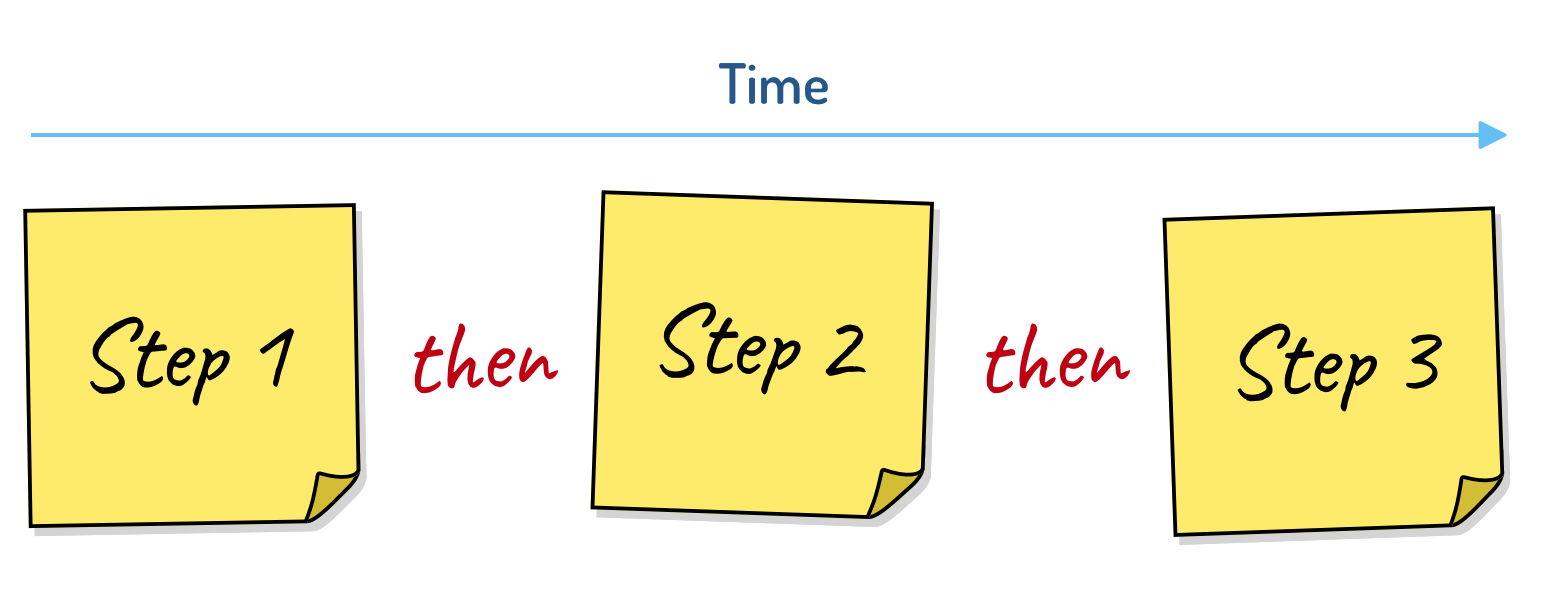
Figure 1. Cards are read horizontally by inserting the word then between each card.
Because the horizontal dimension represents a sequence, it can be read by inserting the word then between cards. So Figure 1 is read as, "A user does step one, then step two, then step three."
Suppose the team is building software that allows employees to submit expense reports and be reimbursed. An employee first logs in. That becomes the first card. The employee then creates a new, blank expense report. That becomes the second card, placed to the right of the log-in card to show the sequence.
The employee then enters expenses and submits the expense report.
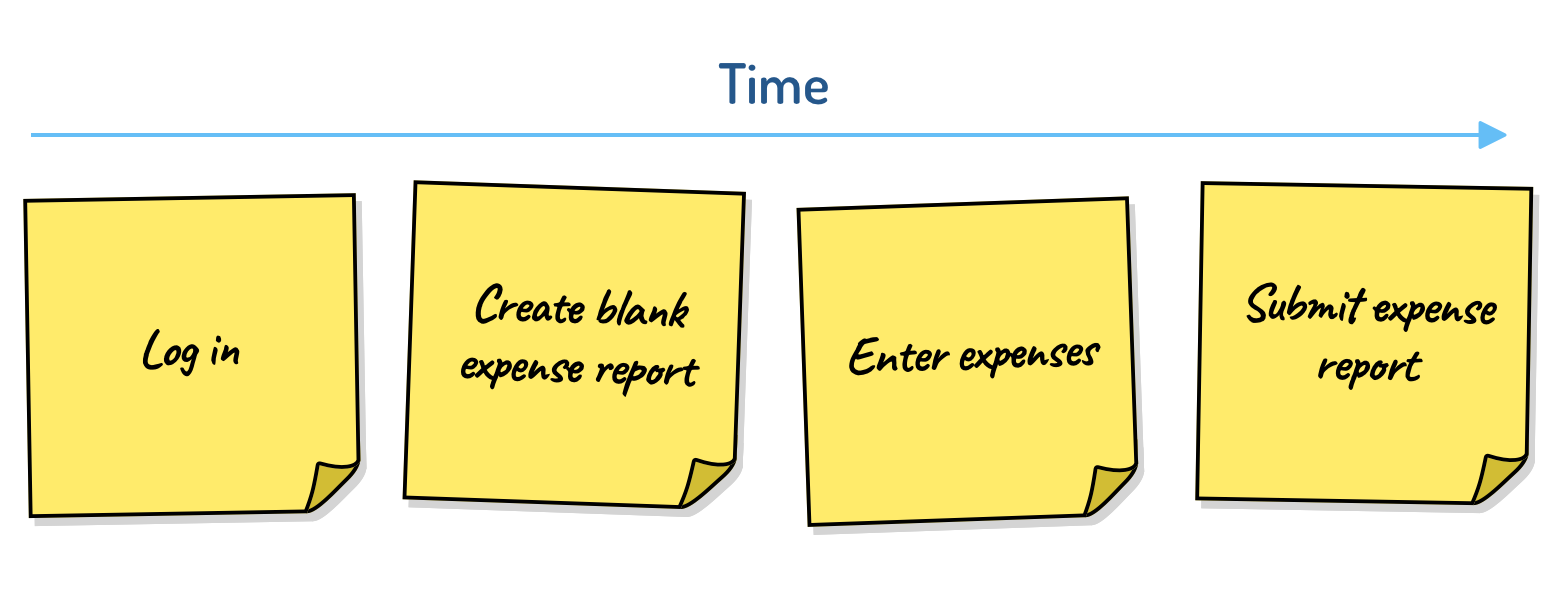
Figure 2. An initial story map for submitting expense reports.
During story mapping, cards are rarely written as complete user stories or job stories. Short three- or four-word phrases are better while mapping. The goal is to create and read the map quickly.
After the session, the product owner or analyst can move items into the team's backlog tool and rewrite selected items using whatever story format the team prefers.
Create and Read the Second Dimension: Down
The second dimension of a story map shows alternatives.
Continuing the expense-report example, suppose participants realize that users can create a new report by copying an old one. Instead of starting with a blank expense report, the user duplicates a recent report and edits the copy.
That alternative can be added under the card for creating a blank expense report.
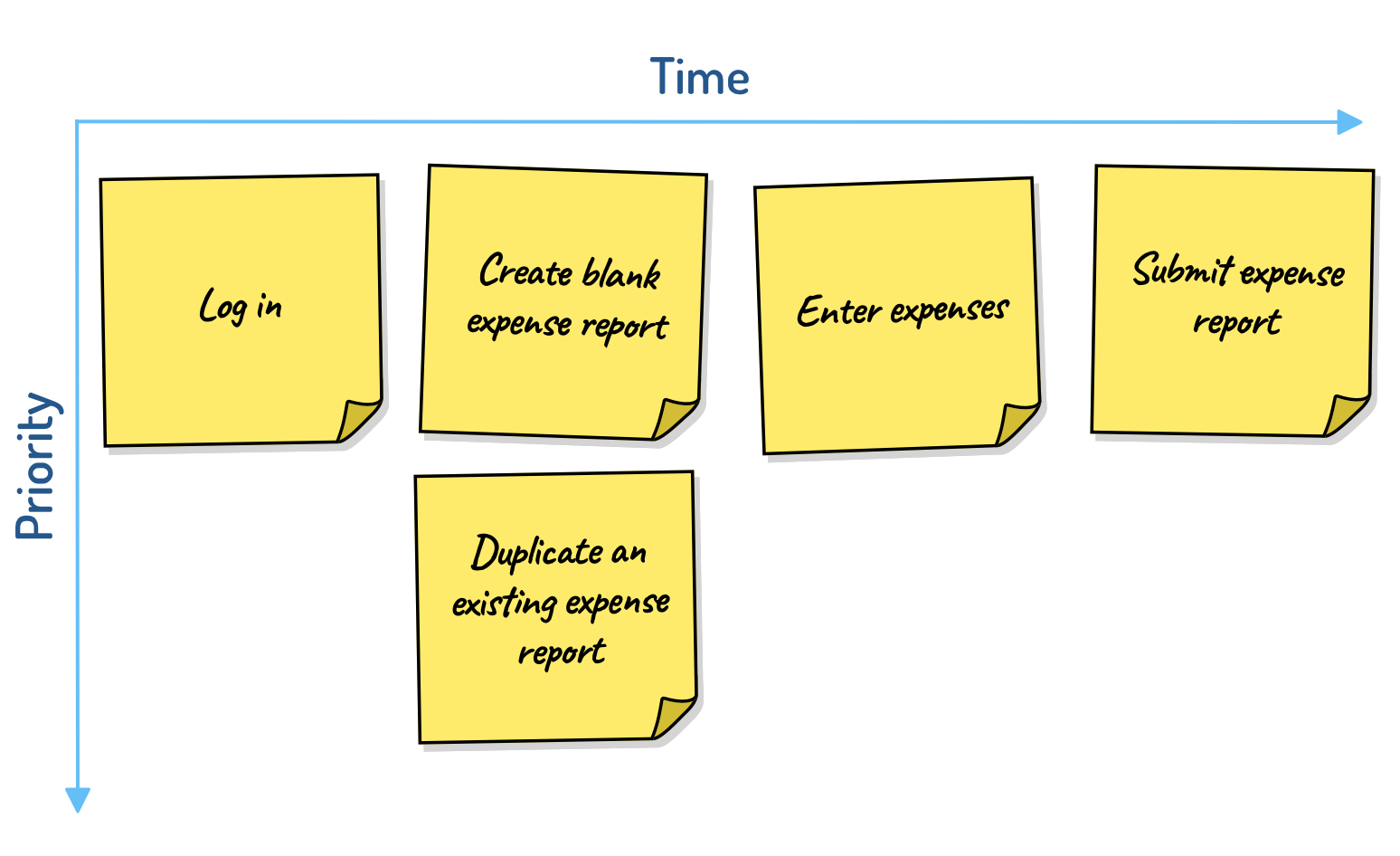
Figure 3. In addition to starting with a blank expense report, users may optionally duplicate an existing expense report.
Because cards in a column are alternatives, read down a column by inserting the word or.
The map now reads: A user logs in, then creates a blank expense report or duplicates an existing one, then enters expenses, and then submits the expense report.
Cards containing alternatives should usually be added in descending order of priority, with the most important at the top and less important alternatives lower in the column. The product owner can change these priorities later, but a short discussion of rough priority within a column can be useful.
Add a Header Row
Some story maps get extremely wide. When that happens, add a row of headings to make the map easier to follow.
For example, suppose a simple word processor allows users to format, print, and save documents. Those categories can be added as heading cards at the top of the map.
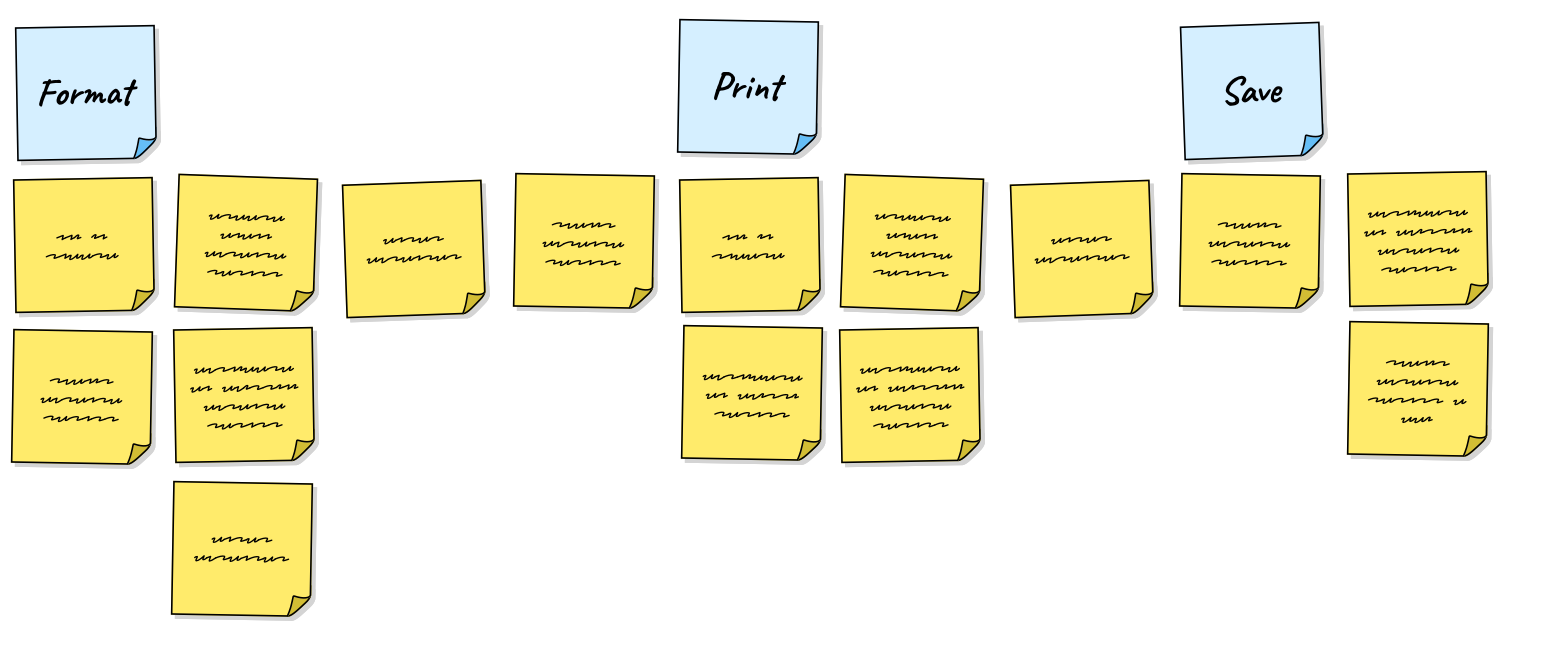
Figure 4. Blue heading cards have been added to indicate where portions of the map begin.
These heading cards can also be read with then between each: a user formats a document, then prints the document, then saves the document.
Heading cards are not usually stories the team will implement directly. They are more like epics, themes, activities, or whatever term your team uses for a group of related stories.
Use Submaps for Large Areas
I find wide maps difficult to follow even with heading rows. A better practice is often to keep the main map concise and use submaps.
Think of each card in a story map as something you can metaphorically double-click into and expand into its own map.
For the simple word processor, the main map could contain only three high-level cards: Format, Print, and Save.
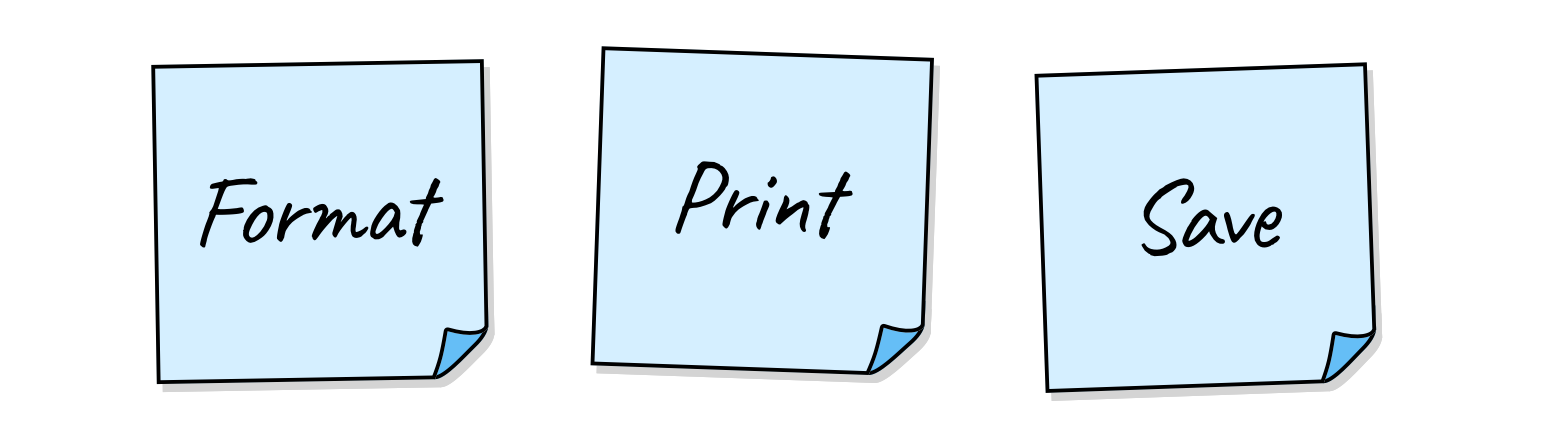
Figure 5. A high-level story map showing the three top-level actions in an extremely simple word processor.
Each of those cards can contain its own two-dimensional story map. If we mentally double-click on Format, Print, or Save, we can open a more detailed submap for that area.
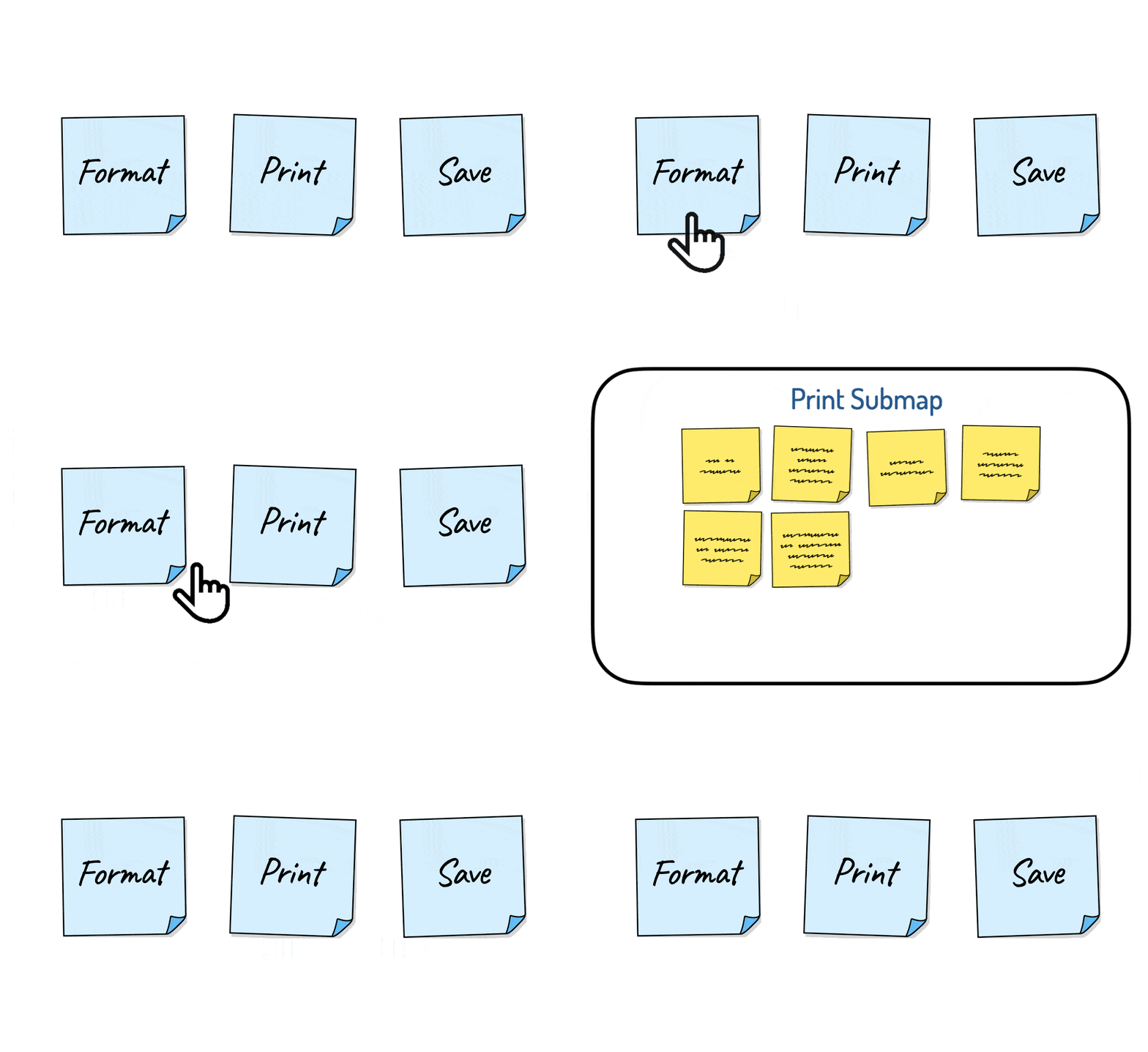
Figure 6. Each card in a map can potentially contain a submap.
Submaps have several advantages:
- They are more readable than one huge map.
- They let the team add additional levels of detail without overwhelming the main map.
- They can be referenced from more than one place in the parent map.
- They can include cards that contain their own submaps.
Useful Story Map Vocabulary
A few terms can help teams talk about story maps more clearly.
Backbone: The top row of a story map. Cards in the backbone are often not implemented directly. They tell the team when it is entering a new area of functionality, much like signs along a highway tell you when you are entering a new city or state.
Step: Any card on the story map.
Activity: A collection of steps that achieves a goal. For example, logging in is an activity that may contain multiple steps.
Narrative: A sequence of items read across the map. For example, a narrative about sending an email might be select recipients, then enter the subject line, then send the email.
User stories: Stories can be made from steps and activities. Steps are often small enough to complete in a sprint. Activities are often larger and may need to be split into smaller stories.
Use Story Maps to Find Missing Functionality
Story maps help teams discover user activities and functionality they might have overlooked.
Walk through the map from a user's perspective and look for gaps. At each step, ask:
- What will a user most likely want to do next?
- What mistakes could a user make here?
- What could confuse a user at this point?
- What additional information could a user need?
If the product has multiple types of users, ask these questions for each type of user.
In the expense-report example, walking through the map might reveal that users often need to attach receipts. That adds a new step.
The team may then identify alternatives under that step. The product could allow users to scan a receipt with a device camera. It could also allow users to attach an existing PDF or image. Each alternative can be placed under the Attach Receipts card.
Convert Story Maps Into Product Roadmaps
Because story maps are arranged vertically in rough priority order, a product owner can use the map to show an intended sequence of features across one or more releases.
To create a roadmap from a story map, add a horizontal line and move above the line everything that must be included in the next release or version.
Returning to the expense-report example, a releasable product might allow users to log in and create a new expense report. Those cards go above the first line.
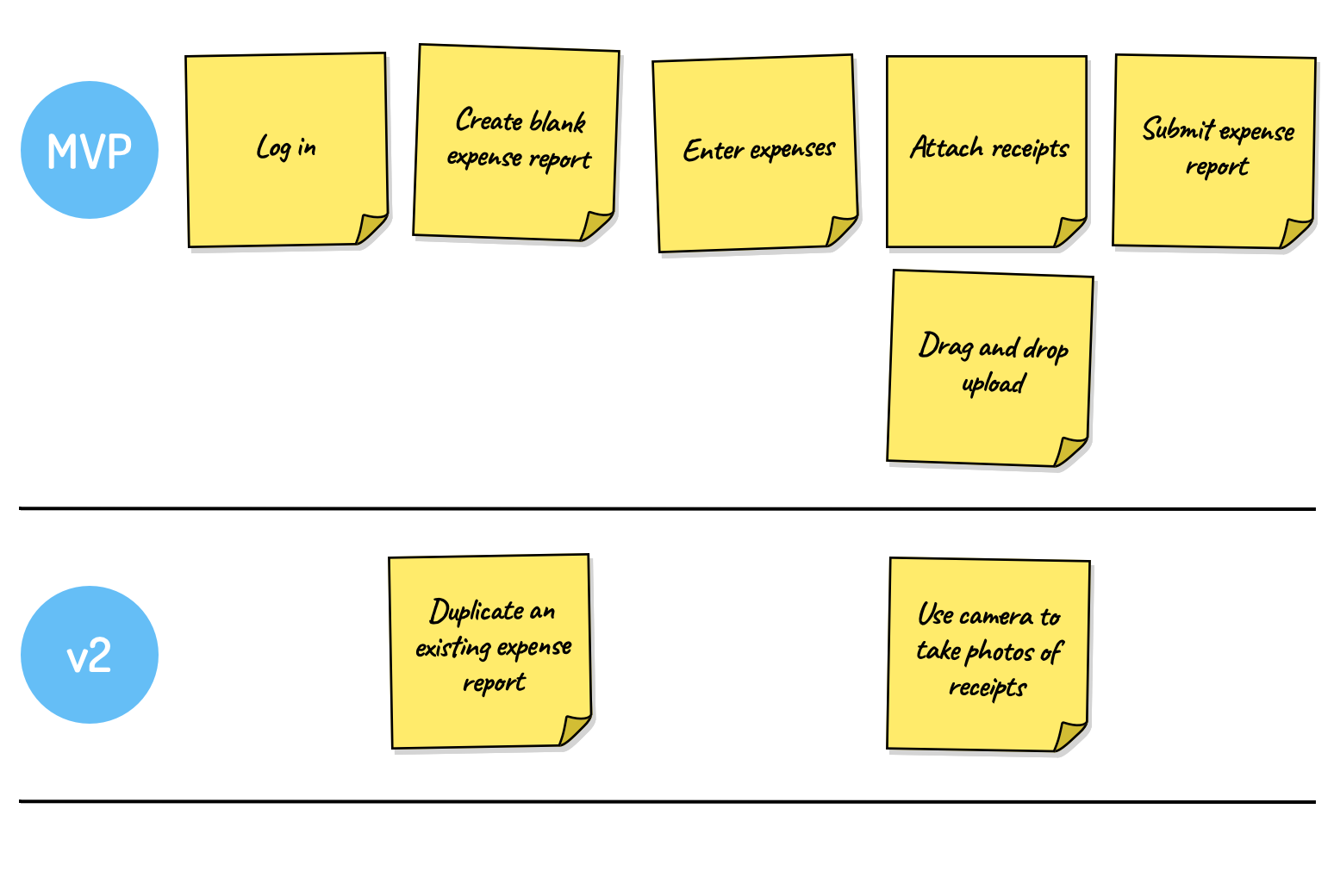
Figure 7. Lines can be added to a story map to indicate planned releases.
Starting with a new blank report may be enough for the first release. Duplicating an existing report can come later, so it sits below the first release line.
Users may need to attach receipts in the MVP, but the first version might support only dragging and dropping existing image files. Activating a mobile device's camera to scan receipts can be planned for a later version and placed below the next line.
The roadmap is not fixed. It is a visible way to discuss what should come first and what can wait.
Common Questions
Is Story Mapping Required for User Stories?
No. Story mapping is a tool. Use it when the team needs help understanding relationships among stories, user journeys, gaps, alternatives, or release options.
How Detailed Should a Story Map Be?
Detailed enough to support the decision the team is making. Early maps can be rough. As work moves closer to implementation, individual stories need more refinement.
Who Should Attend a Story Mapping Session?
Include the product owner and people who will build, test, design, or support the work. Add stakeholders, users, customers, or subject matter experts when their knowledge is needed.
Can a Story Map Replace a Product Backlog?
Usually no. A story map helps discover, organize, and discuss stories. The product backlog still provides ordering, refinement, and ongoing management.
Should Story Map Cards Be Written as Complete User Stories?
Usually not during the first pass. Short phrases are easier to create, move, and read during mapping. Convert selected cards into fuller user stories later when the team is ready to refine them.
Recommended Articles
- User Stories: How to Create Story Maps
- How to Run a Successful User Story Writing Workshop
- Building a Product Users Want: from Idea to Backlog with the Vision Board
- Now Vs. Not-Now Prioritization Along with Medium-Term Goals
All Articles on This Subtopic
- User Stories: How to Create Story Maps
- How to Run a Successful User Story Writing Workshop
- Building a Product Users Want: from Idea to Backlog with the Vision Board
- Now Vs. Not-Now Prioritization Along with Medium-Term Goals
Story Mapping Resources
Get feedback on user stories, job stories, technical stories, and other backlog items.